


Apple Watch Tips for Beginners
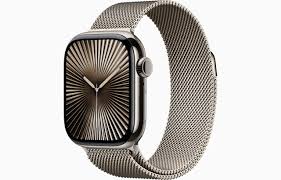
An Apple Watch is much more than a smartwatch. It works as a fitness tracker, communication tool, health monitor, and daily productivity companion all in one compact device. For beginners, it is important to understand the core features first, which makes the overall experience smoother and more enjoyable. Many new users buy an Apple Watch for notifications or fitness tracking, but they later discover advanced features that improve daily routines, health management, and convenience. The first step after purchasing an Apple Watch is pairing it properly with an iPhone. During setup, users should enable location services, health tracking, notifications, and app synchronization because these settings unlock the full potential of the device. Once the setup process is completed correctly, the watch becomes a seamless extension of the smartphone rather than just another gadget.
Apple Watch Interface
Many beginners feel confused when they navigate the Apple Watch interface for the first time because the screen is smaller than a phone display. Learning the basic controls early helps users operate the device confidently without frustration. The Digital Crown is one of the most important parts of the Apple Watch. It allows scrolling, zooming, opening apps, and returning to the home screen. Pressing the side button opens recent apps and emergency settings. Swiping down from the top reveals notifications, while swiping up opens the Control Center, where users can quickly manage brightness, battery mode, Wi-Fi, airplane mode, and focus settings.
Essential Apple Watch Settings
Many users continue using default settings without realizing that small adjustments can greatly improve battery life, performance, and comfort. Beginners should optimize settings immediately after setup for a better long-term experience. Brightness settings should be adjusted to a comfortable level instead of using maximum brightness continuously. Reducing unnecessary background app refresh also helps improve battery efficiency. Notification management is equally important because excessive alerts can become distracting. Enabling automatic software updates ensures the watch receives the latest Apple Watch features, performance improvements, and security patches.
Apple Watch Health Features
One of the biggest reasons behind the growing popularity of Apple Watch devices is health monitoring. Beginners often underestimate how useful these features can become in daily life. The heart rate monitoring system tracks heart activity throughout the day and can notify users about unusually high or low heart rates. The sleep tracking feature provides insights into sleeping patterns, helping users build healthier nighttime routines. Activity rings encourage movement by tracking calories burned, exercise minutes, and standing time. Fitness tracking is another major advantage for beginners starting a healthier lifestyle.
Battery Saving Tips for Apple Watch Users
Battery management is one of the most searched Apple Watch topics among beginners because improper usage can reduce battery performance quickly. Fortunately, several practical habits can help extend battery life significantly. Lowering screen brightness, reducing unnecessary notifications, disabling always-on display when not needed, and limiting location usage all contribute to longer battery duration. Beginners should also close apps they no longer use and avoid excessive background refresh activity. Using Power Saving Mode during workouts can further preserve battery performance. Every user should buy the Apple Watch that matches their lifestyle and needs. Apple Watch price in Pakistan directly influences user choices and preferences when they purchase their desired Apple Watch.
Best Apple Watch Apps for Beginners
The Apple Watch becomes far more useful when paired with the right applications. Beginners should start with practical apps that improve productivity, communication, fitness, and organization.
Some of the most useful categories include:
-
Fitness and workout tracking apps
-
Weather forecast applications
-
Note-taking and reminder tools
-
Meditation and mindfulness apps
-
Calendar management apps
-
Music and podcast streaming services
Apple Watch Fitness Tips for Beginners
The Apple Watch supports multiple workout types, including walking, running, cycling, swimming, strength training, yoga, and high-intensity interval training. Accuracy improves when personal health details such as age, weight, and height are entered correctly during setup. Beginners should also calibrate the watch through outdoor walks or runs because this enhances movement tracking precision. Closing activity rings consistently can become a powerful motivational system. Instead of aiming for unrealistic goals immediately, beginners should gradually increase movement targets to create sustainable fitness habits over time.
Privacy and Security Features
Smartwatch security is often ignored by beginners, but protecting personal information remains important because the Apple Watch stores messages, health data, payment information, and personal activity records. Enabling a passcode adds basic protection against unauthorized access. Features like wrist detection automatically lock the watch when removed. Apple Pay security measures also ensure contactless payments remain encrypted and protected during transactions. Users should review app permissions regularly and avoid granting unnecessary access to sensitive information. Keeping software updated also helps protect the device against security vulnerabilities.
Final Thoughts
The Apple Watch becomes more useful over time as users integrate it into their daily routines. Beginners who spend time understanding customization, health tools, productivity features, and battery optimization usually gain the best experience. Instead of treating the watch as a simple accessory, users should view it as a personal assistant designed to improve convenience, fitness, communication, and time management. Small adjustments and consistent usage habits transform the Apple Watch into one of the most practical technology devices for modern lifestyles.
- Digital Agency
- Literie
- Location de voitures
- Restaurant
- Restaurant
- Mode
- Mode
- Information
- Marketing
- Tourisme
- Développement
- Découverte
- Législation
- Gastronomie
- Pâtisserie
- Evento
- Art
- Causes
- Crafts
- Dance
- Drinks
- Film
- Fitness
- Food
- Jogos
- Gardening
- Health
- Início
- Literature
- Music
- Networking
- Outro
- Party
- Religion
- Shopping
- Sports
- Theater
- Wellness
 Portuguese (Brazil)
 Indian
 English
 French
 Arabic
 Spanish
 Portuguese
 Deutsch
 Turkish
 Dutch
Dutch
 Italiano
 Russian
 Romaian
 Greek
Greek
