


How to Troubleshoot APN Configuration Errors in 4G Level Transmitters
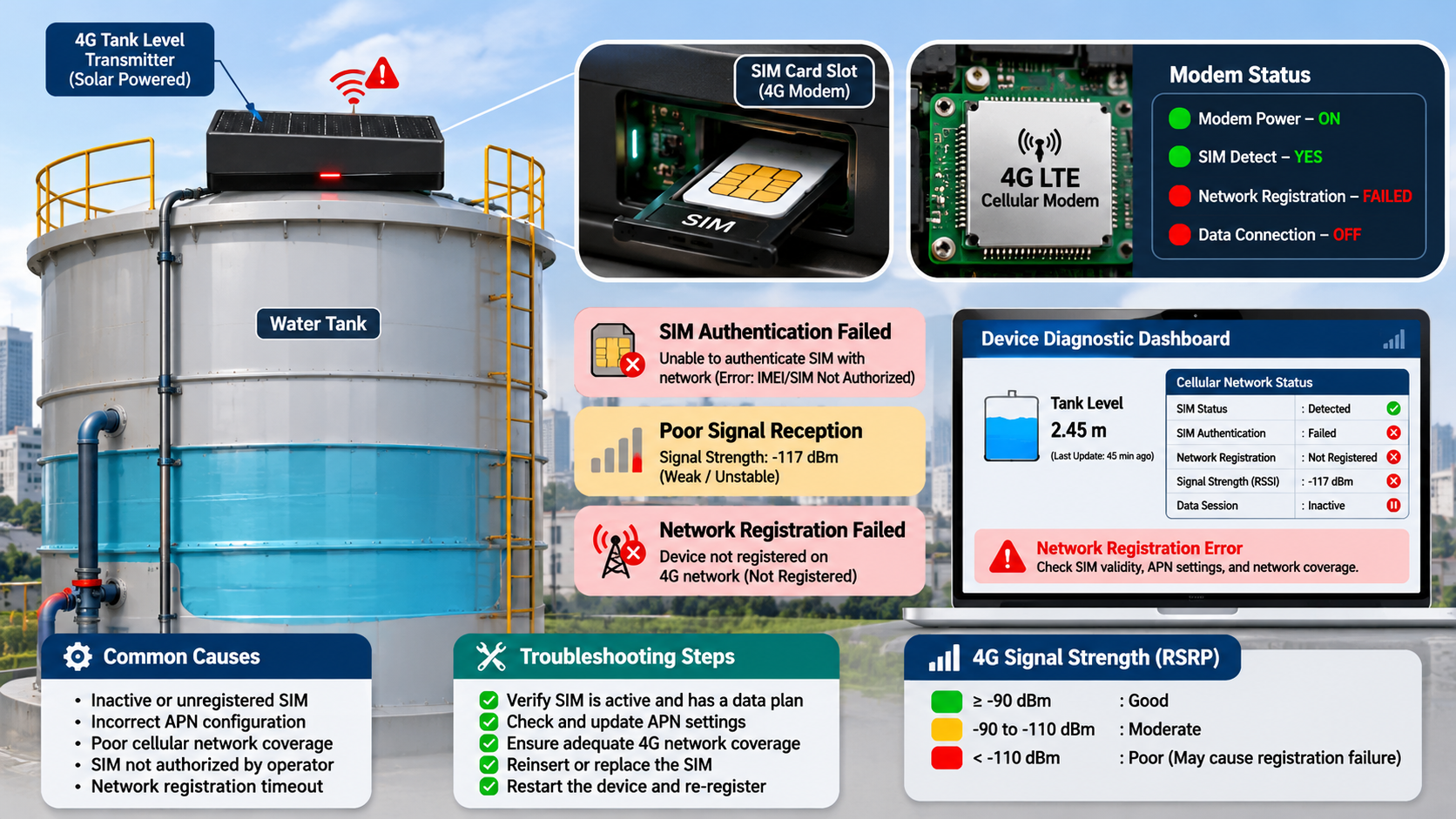
Remote water-level monitoring allows businesses to track storage tank conditions without requiring frequent physical inspections. Many modern monitoring systems use 4G-enabled transmitters to send water-level readings directly to cloud platforms through cellular networks.
However, even when a tank level transmitter measures water accurately, incorrect Access Point Name (APN) settings can prevent it from transmitting data to the monitoring platform.
APN configuration errors are a common connectivity issue in cellular-based IoT installations. They can cause failed internet connections, missing readings, delayed updates, and interruptions in remote monitoring.
Understanding how APN settings work and how to troubleshoot configuration problems is essential for maintaining reliable communication between a Water tank level sensor and its cloud monitoring system.
This article explains common APN configuration errors, their causes, and practical troubleshooting methods for 4G-enabled level transmitters.
Key Takeaways
|
Common APN issue |
Possible effect |
Recommended solution |
|
Incorrect APN name |
Cellular data connection fails |
Verify operator-specific APN details |
|
Wrong authentication settings |
Network registration or data session fails |
Check username and password requirements |
|
Incorrect SIM configuration |
Device cannot access mobile data |
Verify SIM activation and provisioning |
|
Unsupported network bands |
Poor or unavailable cellular connectivity |
Check device and operator compatibility |
|
Incorrect IP settings |
Data cannot reach the destination |
Review network configuration |
|
Data plan restrictions |
Connection stops or becomes unavailable |
Confirm SIM data availability |
|
Incorrect DNS settings |
Cloud server cannot be resolved |
Verify DNS configuration |
|
Firmware problems |
APN settings may not work correctly |
Check manufacturer-approved updates |
What Is APN Configuration in a 4G Level Transmitter?
APN stands for Access Point Name. It identifies the network access configuration that a cellular device uses to connect to a mobile operator's data network.
A 4G-enabled tank level transmitter uses a SIM card to establish a cellular data connection. The APN settings help the device access the operator's network and, depending on the service, communicate with the public internet or a private data network.
A typical communication process works as follows:
-
The Water tank level sensor measures the water level.
-
The transmitter processes the measurement.
-
Its cellular modem connects to the mobile network using the SIM card.
-
The modem establishes a data connection using the configured APN.
-
The transmitter sends readings to the cloud platform or configured server.
-
Operators view the information through a monitoring dashboard.
If the APN configuration is incorrect, the device may register with the cellular network but fail to establish a usable data connection.
This distinction is important because cellular network registration and internet connectivity are not the same thing.
Common APN Configuration Errors in 4G Level Transmitters
Incorrect APN Name
An incorrect APN name is one of the most common causes of cellular data connection failures.
Every mobile operator provides specific APN settings for its services. If the transmitter uses an incorrect APN, it may fail to establish a data session.
For example, an IoT SIM card may require a private APN rather than the standard consumer internet APN.
How to fix it:
-
Obtain the correct APN from the SIM provider.
-
Check whether the SIM uses a public or private APN.
-
Enter the APN exactly as provided.
-
Check for spelling errors and unwanted spaces.
-
Save the configuration and reconnect the modem.
Do not assume that every SIM card from the same mobile operator uses identical APN settings. Corporate and IoT subscriptions may have different configurations.
Incorrect APN Username and Password
Some cellular services require authentication before allowing a device to access the data network.
Depending on the operator's configuration, authentication may use a username, password, or a specific authentication method.
If these details are incorrect, the device may fail to establish a data connection.
How to fix it:
-
Confirm whether authentication is required.
-
Obtain the correct credentials from the SIM provider.
-
Verify the username and password.
-
Check the authentication method supported by the modem.
-
Save the settings and test the connection again.
If the operator does not require authentication, avoid entering unnecessary credentials.
SIM Card Not Activated for Data Services
A SIM card may be physically installed and recognized by the transmitter but still be unable to access mobile data.
Possible reasons include:
-
SIM activation is incomplete.
-
The data plan has expired.
-
The SIM is suspended.
-
The subscription does not support the required service.
-
The SIM is restricted to a private network.
How to fix it:
-
Check the SIM activation status.
-
Confirm that mobile data is enabled.
-
Verify the available data balance or subscription status.
-
Contact the SIM provider to confirm IoT service provisioning.
-
Test the SIM in a compatible device, where permitted by the provider.
Incorrect Network Mode or Band Selection
A 4G level transmitter must support the cellular frequency bands used by the mobile operator at the installation location.
If the modem is configured for an unsupported network mode or frequency band, connectivity may be unreliable or unavailable.
For example, a device imported from another market may not support all the cellular bands used by Indian operators.
How to fix it:
-
Check the modem's supported LTE bands.
-
Verify compatibility with the selected mobile operator.
-
Review the network mode configuration.
-
Confirm local 4G coverage.
-
Use an approved antenna suitable for the modem.
Incorrect IP Configuration
Some transmitters support configurable network parameters, including IP addressing and routing settings.
An incorrect static IP address, subnet configuration, or gateway setting may prevent the device from communicating with the required server.
Many cellular devices obtain network parameters automatically through the mobile operator, so manual changes should only be made when required.
How to fix it:
-
Check whether the device uses automatic or static IP configuration.
-
Verify any manually configured network parameters.
-
Confirm the required gateway settings.
-
Follow the SIM provider's instructions for private network access.
DNS Configuration Problems
DNS stands for Domain Name System. It translates domain names into IP addresses.
A transmitter may successfully establish a cellular data connection but fail to reach the cloud server if it cannot resolve the server's domain name.
This can happen because of incorrect DNS settings, network restrictions, or problems with the configured DNS service.
How to fix it:
-
Verify the configured server address.
-
Check DNS settings if the device allows manual configuration.
-
Confirm that the SIM network permits the required DNS access.
-
Test the connection using the manufacturer's diagnostic tools.
Firewall and Private APN Restrictions
Some organizations use private APNs to connect IoT devices to internal networks.
These services may include security policies that restrict access to specific IP addresses, ports, or server destinations.
If the required communication endpoint is blocked, the transmitter may connect to the mobile network but fail to deliver readings.
How to fix it:
-
Confirm the private APN's access permissions.
-
Verify the destination server and port.
-
Check firewall and routing rules.
-
Coordinate with the SIM provider and network administrator.
-
Confirm that the monitoring platform's communication requirements are permitted.
How to Troubleshoot APN Configuration Errors Step by Step
A systematic troubleshooting process helps identify whether the issue originates from the SIM card, cellular modem, APN configuration, or cloud connection.
Step 1: Check SIM Card Status
Start by confirming that the SIM card is active and supports the required IoT data service.
Check:
-
SIM activation.
-
Subscription validity.
-
Data availability.
-
Network restrictions.
-
SIM compatibility.
Step 2: Verify Cellular Network Registration
Check whether the modem can detect and register with the mobile network.
If network registration fails, investigate SIM status, signal coverage, antenna connections, network compatibility, and modem settings before changing APN parameters.
Step 3: Confirm the Correct APN
Obtain the APN details directly from the SIM provider.
Verify:
-
APN name.
-
Username.
-
Password.
-
Authentication method.
-
IP type, if specified.
-
Private network requirements.
Avoid using APN details copied from unrelated devices or subscriptions.
Step 4: Check Signal Strength
Weak cellular coverage can cause intermittent data connections.
Inspect signal quality at the actual transmitter location, particularly in underground chambers, enclosed pump rooms, and areas surrounded by reinforced concrete.
If necessary, reposition the antenna or use a compatible external antenna.
Step 5: Test Internet Connectivity
If the modem registers with the network and establishes a data session, check whether the transmitter can reach its intended server.
Use the device's available diagnostic functions to distinguish between:
-
Network registration failure.
-
Data session failure.
-
DNS resolution failure.
-
Server connection failure.
-
Application-level transmission failure.
Step 6: Verify Cloud Server Settings
Confirm that the transmitter uses the correct server address, communication port, protocol, and authentication details.
If the device can connect to the network but cannot upload readings, the problem may be related to server configuration rather than the APN.
Step 7: Review Firmware and Device Logs
Check the transmitter's diagnostic logs for modem errors, network disconnections, or failed data sessions.
If firmware updates are required, use only manufacturer-approved versions and follow the recommended update procedure.
How to Identify Whether the Problem Is APN-Related
Not every 4G communication failure is caused by an APN configuration error.
The following comparison can help narrow down the issue.
|
Observed condition |
Possible cause |
What to investigate |
|
SIM is not detected |
SIM or hardware problem |
SIM installation and modem |
|
No cellular registration |
Coverage or compatibility problem |
Signal, LTE bands, SIM status |
|
Network registered but no data session |
APN or subscription issue |
APN and authentication |
|
Data session active but server unreachable |
DNS, routing, or firewall issue |
Network and server settings |
|
Server reachable but readings missing |
Application configuration issue |
Device identity and data protocol |
|
Readings arrive intermittently |
Signal or network instability |
Antenna and coverage |
This approach prevents unnecessary changes to a working configuration.
Why APN Configuration Matters for Remote Water Monitoring
A 4G-enabled tank level transmitter can provide remote access to water-level information across different buildings and geographical locations.
However, this functionality depends on reliable cellular communication.
Incorrect APN settings can interrupt the data flow and affect:
-
Remote tank-level visibility.
-
Low-level notifications.
-
High-level alerts.
-
Historical measurement records.
-
Water replenishment planning.
-
Centralized monitoring operations.
For example, a transmitter may continue measuring the actual water level even when its cellular connection is unavailable. In that situation, the cloud dashboard may show an older reading rather than the current tank condition.
A reliable monitoring system should display the last-updated timestamp and identify devices that have stopped communicating.
The Role of MyTank in 4G-Based Water Monitoring
When evaluating MyTank for a cellular-based water monitoring project, consider how the actual product configuration supports 4G transmitters, SIM connectivity, and remote data communication.
The important factors to verify include:
4G Device Compatibility
Confirm which cellular-enabled tank level transmitter models are supported.
APN Configuration
Check whether APN settings can be configured through the device interface or require manufacturer assistance.
Remote Monitoring
Verify whether operators can view readings from multiple tanks through a centralized dashboard.
Communication Status
Check whether the system identifies offline devices and displays the latest successful data update.
Alerts and Notifications
Confirm whether the available configuration supports low-level, high-level, and communication-loss notifications.
Historical Data
Determine whether previously received readings remain available for troubleshooting and performance analysis.
Network Integration
Confirm compatibility with the selected SIM provider, cellular network, and cloud communication requirements.
These capabilities should be verified using current MyTank product documentation and the actual project configuration. A monitoring platform cannot correct an invalid APN or restore a cellular service that is unavailable.
Best Practices to Prevent APN Configuration Problems
Preventive planning can reduce communication interruptions and make cellular monitoring easier to maintain.
Use IoT-Compatible SIM Cards
Choose SIM subscriptions designed for connected devices and confirm that they support the required network services.
Maintain APN Documentation
Record the approved APN name, authentication method, network settings, and SIM provider details for every deployment.
Store credentials securely rather than including passwords in publicly accessible installation documents.
Verify Cellular Coverage
Test network availability at the actual tank installation location before deployment.
Standardize Device Configuration
Where possible, use a documented configuration template for compatible transmitters. Verify every device after provisioning.
Monitor SIM and Data Status
Review subscription validity, data usage, and network availability periodically.
Test Communication After Installation
Confirm that the transmitter can register, establish a data session, reach the configured server, and successfully upload a measurement.
Plan for Communication Interruptions
Where supported, use local data buffering and automatic retransmission to reduce data loss during temporary network outages.
APN Troubleshooting Checklist
Use this checklist when a 4G-enabled transmitter stops sending water-level readings.
|
Troubleshooting item |
Verification |
|
SIM card |
Active and correctly installed |
|
Data service |
Subscription supports IoT communication |
|
Cellular registration |
Modem connected to mobile network |
|
APN name |
Matches provider instructions |
|
Authentication |
Correct username, password, and method |
|
Network bands |
Compatible with local operator |
|
Signal strength |
Suitable at installation location |
|
IP configuration |
Correct for the selected service |
|
DNS |
Server domain can be resolved |
|
Firewall |
Required destinations and ports are permitted |
|
Cloud endpoint |
Correct server and protocol |
|
Device logs |
No unresolved modem or application errors |
If all settings appear correct but communication remains unavailable, contact the SIM provider, transmitter manufacturer, or network administrator for further diagnostics.
Conclusion
APN configuration errors can prevent a 4G-enabled tank level transmitter from sending water-level readings to a remote monitoring platform. Incorrect APN names, authentication settings, SIM provisioning, network compatibility, DNS configuration, and private network restrictions are common causes.
The best troubleshooting approach is to check SIM status, verify cellular registration, confirm APN settings, test data connectivity, and investigate the cloud server connection separately.
A reliable Water tank level sensor requires more than accurate measurement hardware. It also needs compatible cellular connectivity, correct network configuration, and dependable data handling.
When considering MyTank for remote water monitoring, verify the supported 4G transmitters, APN configuration process, communication diagnostics, and cloud integration requirements.
With proper SIM provisioning, documented network settings, and regular connectivity checks, organizations can reduce communication interruptions and maintain more reliable remote water-level monitoring.
- Digital Agency
- Literie
- Location de voitures
- Restaurant
- Restaurant
- Mode
- Mode
- Information
- Marketing
- Tourisme
- Développement
- Découverte
- Législation
- Gastronomie
- Pâtisserie
- Event
- Art
- Causes
- Crafts
- Dance
- Drinks
- Film
- Fitness
- Food
- Παιχνίδια
- Gardening
- Health
- Κεντρική Σελίδα
- Literature
- Music
- Networking
- άλλο
- Party
- Religion
- Shopping
- Sports
- Theater
- Wellness
 Greek
 Indian
 English
 French
 Arabic
 Spanish
 Portuguese
 Deutsch
 Turkish
 Dutch
 Italiano
 Russian
 Romaian
 Portuguese (Brazil)